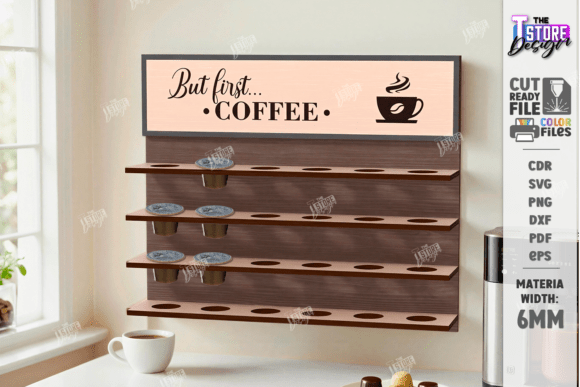
Elevate Your Coffee Station with a Precision Laser Cut Wall Holder
There is something undeniably satisfying about walking into a kitchen where everything has its place, especially the morning coffee ritual. For many, the clutter of loose coffee pods on the counter detracts from the experience. This is where a Coffee Pod Holder Laser Cut Wall Holder transforms not just your storage, but your entire workflow. Whether you are a hobbyist looking to expand your portfolio or a small business owner aiming to sell high-demand home decor, understanding the nuances of this digital product is essential for success. It is more than just a file; it is a blueprint for efficiency and style.
However, diving into laser cutting projects without a clear grasp of the technical details can lead to frustration. Many creators rush to download and cut, only to find their final product doesn't fit the wall, the engraving is too deep, or the dimensions are off. By approaching this project with a corrective mindset and paying attention to the specific requirements of laser machinery, you can avoid these common pitfalls and produce a professional-grade coffee station every time.
Understanding the File Formats and Machine Compatibility
One of the most frequent misunderstandings occurs right at the start: choosing the wrong file format for your specific software. The digital package for a Coffee Pod Holder Laser Cut Wooden Coffee Station typically includes a variety of formats like SVG, EPS, PNG, PDF, and DXF. While having options is great, using the incorrect one for your machine can distort your design.
A critical piece of advice often overlooked involves users of LightBurn software. While SVG files are popular for vector graphics, LightBurn can sometimes distort the dimensions of these files during import. This might seem minor, but in a project requiring precise alignment for wall mounting, even a millimeter of error can prevent the holder from sitting flush against the surface. If you are working with LightBurn, we strongly suggest using the DXF file format instead for better results and dimensional accuracy. Always verify your machine and software compatibility before sending a job to the laser bed.
The Importance of Color Coding: Red vs. Black
Once your file is imported correctly, the next step is interpreting the vector lines. A standard convention in laser cutting files is the use of specific colors to denote different actions. In this specific design, the RED line indicates CUT paths, while the BLACK line indicates ENGRAVE paths. Ignoring this distinction or assigning the wrong power settings to these colors can ruin your material.
If you accidentally set the red lines to engrave, your machine will waste time etching outlines rather than cutting through the wood, potentially burning the surface without separating the pieces. Conversely, if you set the black lines to cut, you might slice through decorative elements that were meant to remain solid. Before starting, take a moment to review your software's layer settings. Ensure that the red vectors are assigned to your cutting parameters (higher power, slower speed) and the black vectors to your engraving parameters (lower power, faster speed). This simple check saves material and ensures the structural integrity of your Coffee Capsule Holder Wall Coffee Station.
Material Selection and Structural Integrity
The beauty of a Coffee Pod Holder Laser Cut Wall Holder lies in its simplicity, but its durability depends heavily on material choice. Beginners often opt for the thinnest plywood available to save costs or reduce cutting time. However, coffee pods have weight, and a holder loaded with a month's supply of capsules exerts significant downward force. Using material that is too thin can lead to warping or, worse, the shelves snapping under pressure.
For a robust result, consider using 3mm to 6mm Baltic birch plywood. This material offers excellent layer consistency, which is crucial for clean edges when the laser cuts through. Additionally, think about the finish. Unfinished wood looks rustic, but coffee oils and moisture can stain it over time. Applying a food-safe sealant or a light varnish after cutting not only protects the wood but also enhances the contrast of the engraved black lines, making the design pop. Remember, the goal is a functional piece of furniture, not just a decorative prototype.
Customization and Scaling Errors
Flexibility is a major advantage of digital files. You might want a larger holder for a commercial breakroom or a compact version for a tiny apartment kitchen. However, scaling vector files requires caution. When you resize an SVG or DXF, ensure that you are maintaining the aspect ratio to prevent distortion. More importantly, check the stroke width of your cut lines after scaling.
If you scale a design down significantly, the kerf (the width of the material removed by the laser) might become proportionally larger compared to the joint sizes, leading to loose fittings. If you scale up, ensure your machine's bed size can accommodate the new dimensions. If you need a specific size that isn't immediately obvious how to achieve, or if you require a different color scheme for the preview PNG files, do not hesitate to reach out. Please write me if you need another type of file, or another color or size of PNG file. Customization should enhance the project, not compromise the mechanics of the assembly.
Maximizing Efficiency for Small Business Owners
For entrepreneurs and freelancers, time is money. Producing a CNC File Coffee Station Wall Holder in batches requires an optimized workflow. One common inefficiency is nesting parts poorly on the material sheet. Instead of cutting one holder at a time, arrange multiple units on your plywood sheet to minimize waste and reduce the number of machine runs.
Furthermore, consider the post-processing time. Designs with intricate internal engravings look stunning but take longer to clean if soot accumulates in the grooves. Test a single unit first to gauge the cleaning time required. If you plan to sell these holders, factor this labor cost into your pricing. A clean, well-finished product commands a higher price point than one that looks rushed or has burn marks. By refining your process now, you build a reputation for quality that encourages repeat customers.
Final Checks Before Cutting
Before you hit the "Start" button on your laser cutter, perform a final simulation. Most modern software allows you to preview the job path. Look for any unconnected lines or overlapping vectors that could cause the laser head to make unnecessary movements. Verify that the origin point is set correctly so you don't cut off the edge of your material.
Remember, the digital file is just the starting point. The real value comes from how you apply it. Whether you are making this for your own home to organize your morning brew or producing them as part of a product line, attention to detail separates the amateurs from the pros. Take the time to understand your tools, respect the material, and follow the color-coded instructions precisely.
If you encounter any issues during the process or have questions about specific machine settings, communication is key. Please write me a message if you have any questions. The creator community thrives on shared knowledge, and getting clarification early can prevent costly mistakes. Thank you for visiting my shop and investing in a design that blends functionality with modern aesthetics. To stay updated on new designs, templates, and future releases that can further enhance your crafting or business ventures, be sure to follow the shop. Seeing these updates in your feed ensures you never miss an opportunity to innovate your workspace.