Creative Cat Door Corner Laser Cut Wall Signs
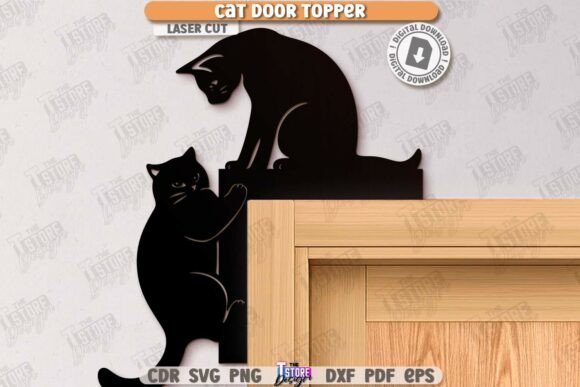
There is a distinct satisfaction in transforming a blank piece of material into a functional piece of art that tells a story about your home. For pet lovers and crafting enthusiasts alike, Cat Door Corner Laser Cut Wall Signs represent more than just a decorative accent; they are a bridge between digital design and tangible expression. These signs, often featuring the silhouette of a black cat peeking around a corner or framing a pet entryway, have become a staple in modern porch décor and interior home decorations. Whether you are running a small business selling custom home goods or simply looking to add a whimsical touch to your own living space, understanding the nuances of these designs can help you maximize their potential.
At their core, these designs are digital templates intended for laser cutting machines. They typically come as a comprehensive zip archive containing multiple file formats, including SVG, EPS, PNG, PDF, and DXF. This variety ensures compatibility across different software ecosystems and hardware capabilities. The design logic is usually straightforward yet effective: specific lines indicate where the machine should cut through the material entirely, while others denote areas for engraving. For instance, in many standard files, red lines signal a cut path, whereas black lines indicate an engrave path. This clear distinction allows users to visualize the final product before a single watt of laser power is applied.
Why Different Creators Value These Designs
The appeal of Cat Door Corner Laser Cut Wall Signs varies significantly depending on who is holding the digital file. A one-size-fits-all approach rarely works when discussing creative tools because the priorities of a hobbyist differ vastly from those of a seasoned entrepreneur.
For beginners just stepping into the world of laser cutting, the primary concern is often ease of use and reliability. They need files that work "out of the box" without requiring complex vector editing. The inclusion of multiple formats like SVG and DXF is crucial here. Beginners might struggle with software quirks; for example, Lightburn users often find that SVG files can sometimes distort dimensions upon import. In such cases, having access to the DXF file format within the same package is a lifesaver, ensuring that the sign cuts to the exact size intended without manual scaling corrections. For this group, the value lies in the learning curve reduction and the confidence gained from completing a project successfully on the first try.
Conversely, professionals and small business owners view these files through the lens of commercial viability and production speed. An entrepreneur running an Etsy shop or a local boutique needs assets that are scalable and consistent. They evaluate the quality of the vector paths to ensure clean edges that require minimal post-processing. Time is money, so the ability to switch between file types to match their specific workflow—perhaps preferring EPS for Adobe Illustrator workflows or DXF for CorelDraw—is essential. Furthermore, the flexibility to request custom colors or sizes for PNG previews helps them create compelling marketing materials for social media, driving sales without needing to photograph every physical prototype.
Tailoring the Project to Your Needs
When evaluating whether a specific Cat Door Corner Laser Cut Wall Sign fits your project, consider your end goal. Are you creating a permanent fixture for your front porch, or is this a prototype for a larger product line?
- Hobbyists and Home Decorators: Your focus is likely on aesthetics and personalization. You might choose a thicker wood or acrylic to make the sign durable against outdoor elements. The "black cat" theme offers a timeless look that fits both Halloween seasonal decor and year-round gothic or cozy styles. For you, the joy comes from the process of selecting the perfect material grain and watching the laser etch the details.
- Educators and Makerspace Instructors: If you are teaching a class, these files serve as excellent educational tools. They demonstrate the difference between cutting and engraving vectors clearly. Instructors can use the provided red and black line distinctions to teach students about layer management and machine settings. The simplicity of the design allows students to focus on machine operation rather than complex design theory.
- Freelance Designers: You might purchase these files to modify and integrate into larger compositions. Having the source files in editable formats like SVG or EPS allows you to combine the cat door element with custom text or other graphical elements to create unique commissions for clients.
Technical Considerations for Success
To get the best results from these digital products, technical compatibility is key. While the zip archive provides a broad range of options, understanding your specific machine's preferences will save you frustration. As noted by experienced users, software behavior can be unpredictable. If you are working with Lightburn, sticking to the DXF file format is often the safest bet to maintain dimensional accuracy. SVGs, while versatile, can occasionally interpret units differently depending on the software version, leading to signs that are slightly too large or small for their intended mounting spot.
Material choice also plays a pivotal role in the final outcome. These signs are designed to be versatile, working well on plywood, MDF, acrylic, and even certain metals with the right fiber laser setup. However, the depth of the cut and the contrast of the engrave will change based on the material. A dark stain on light wood can make the engraved black lines pop, creating a high-contrast look ideal for outdoor visibility. Alternatively, using two-tone acrylic can yield a sleek, modern finish suitable for indoor hallways.
Communication with the creator is another underrated aspect of utilizing these digital assets. Most designers are willing to accommodate specific needs if asked. If you require a different file type not listed in the standard archive, or if you need a PNG preview in a specific color scheme to match your brand palette, sending a message can often yield a customized solution. This collaborative approach ensures that the tool you are using truly serves your specific vision.
Making the Right Choice for Your Workflow
Ultimately, deciding to use Cat Door Corner Laser Cut Wall Signs comes down to aligning the resource with your current capabilities and future aspirations. For the consumer buying a finished product, it is about finding a charming addition to their home that reflects their love for pets. For the creator, it is about accessing a reliable, high-quality base that allows them to focus on fabrication and finishing rather than spending hours drawing vectors from scratch.
The versatility of these files means they can grow with you. A project started as a weekend hobby can evolve into a small batch production run as your skills and equipment improve. The presence of both cut and engrave lines in a single file encourages experimentation with depth and texture, pushing creators to explore the full range of their machine's capabilities. Whether you are marking a pet's special entryway or adding a spooky yet cute element to your seasonal display, these signs offer a practical, creative, and engaging way to bring digital designs into the physical world.
By understanding the file formats, respecting the technical limitations of your software, and recognizing how your specific role influences your needs, you can turn a simple download into a standout piece of craftsmanship. Keep an eye on future releases from designers, as staying updated with new styles and variations can keep your portfolio fresh and your home decor evolving.